
How to install CryptoExcel.
Introduction
This guide explains step by step how to install CryptoExcel, the Excel add-in that connects your spreadsheet to over 100 crypto exchanges.
CryptoExcel is written in Python and integrates directly into Microsoft Excel, allowing you to analyze, track, and even trade crypto without leaving your workbook.
Since Excel for Windows only comes with VBA by default, the installer includes a small Python distribution with the required libraries. Don’t worry — the process is safe, lightweight, and won’t interfere with other programs or Python installations you may already have.
Installation Steps
Follow these steps to install CryptoExcel on your PC:
1. Request the Download
Enter a valid email address in the form
You’ll receive an email with a secure download link.
2. Request the Download
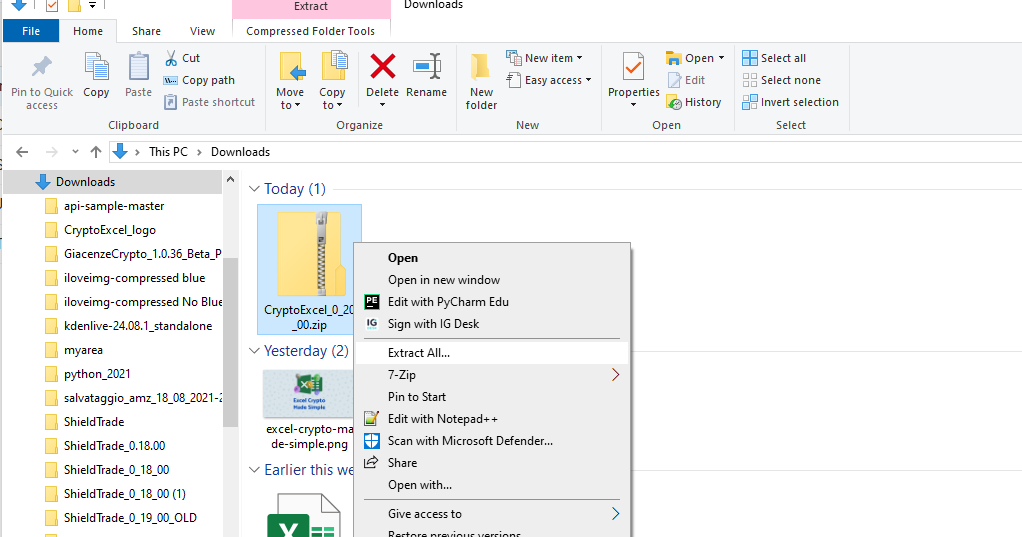
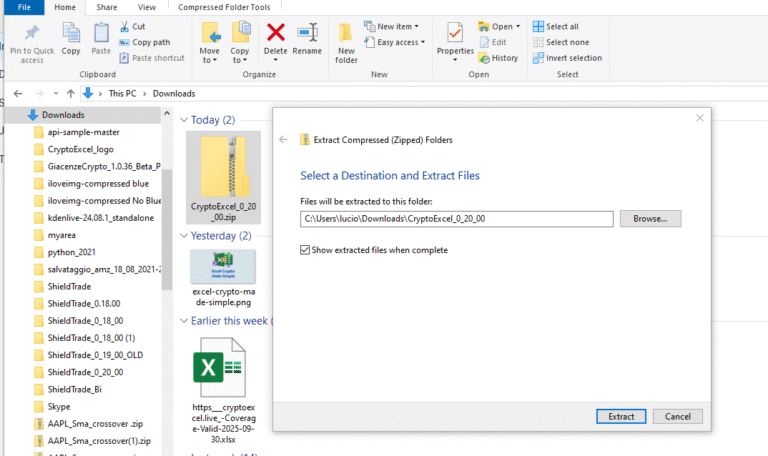
Once downloaded, locate CryptoExcel.zip in your PC’s Downloads folder.
Right-click → Extract All (or use your preferred unzip tool).
3. Close Excel completely
Before installing, make sure all Excel files are closed.
One of the most common problems is that Excel stays running in the background even after you close all windows.
To check:
Press Ctrl + Alt + Canc (or Ctrl + Shift + Esc) and open the Task Manager.
Look for any Excel processes still running.
Select them and click End Task.
Once no Excel processes remain, proceed with installation.
4. Run the installer
Double-click on Install.bat.
If Microsoft Defender SmartScreen shows a warning, click More info → Run anyway.
(This is a standard step for new software — CryptoExcel is safe to install.)
Note About Rebranding
CryptoExcel was previously branded as ShieldTrade.
If you see references to ShieldTrade during installation, simply read it as CryptoExcel.
We apologize for any temporary confusion during this transition.
How to Uninstall CryptoExcel
If you need to remove CryptoExcel:
Quick Removal
Double-click remove_CryptoExcel.bat to uninstall automatically.
Manual Removal
If you prefer to manually remove all installed files:
Go to:
C:\Users\<YourPCName>\AppData\Roaming\(You can also type
%APPDATA%in the Windows search bar to open it quickly.)Delete the following:
%APPDATA%\Microsoft\Excel\XLSTART\xlOil.xllThe entire
%APPDATA%\xlOildirectoryThe
%APPDATA%\ShieldTradedirectory (leftover from the old brand name)
Final Thoughts
Installing CryptoExcel takes only a few minutes and gives you a powerful Excel crypto sheet for live data, portfolio tracking, and trading.
Download CryptoExcel today and start transforming Excel into your personal crypto workstation.
Troubleshooting FAQ – Installing CryptoExcel
The installer doesn’t work. What should I check first?
Make sure all Excel processes are fully closed. Even if no Excel windows are open, the program may still run in the background. Press Ctrl + Alt + Canc (or Ctrl + Shift + Esc) → open Task Manager → end any Excel processes, then try again.
I see a Microsoft Defender warning when I run Install.bat. Is this safe?
Yes. Since CryptoExcel is a new add-in, Windows may show a SmartScreen message. Click More info → Run anyway. The software is safe and runs locally on your PC.
The add-in doesn’t appear in Excel after installation. What can I do?
Close Excel completely (including background processes), then reopen CryptoExcel_test.xlsx. Make sure you click Enable Editing and save the file before restarting Excel.
Can CryptoExcel interfere with other programs or my existing Python installation?
No. CryptoExcel is lightweight and self-contained. It won’t affect other Python environments or software installed on your computer.
Can I use CryptoExcel on Mac or Google Sheets?
Currently, CryptoExcel only works on Microsoft Excel 2010 or higher for Windows desktop. It is not yet supported on Mac, Excel Online, or Google Sheets.