Live Crypto Trades and Order Book
Watch crypto exchange trades update in Excel in real time, with prices, volumes, and timestamps with millisecond precision. Explore market activity as it happens.

Access live and historical crypto data in Excel from 100+ exchanges.
Build custom dashboards, financial models, and an Excel crypto portfolio tracker using your own formulas.
CryptoExcel is an Excel add-in that brings exchange data directly into your spreadsheets. Retrieve prices, order books, trades and historical data with simple Excel crypto functions.
Access prices, trades, order books and OHLCV.
Create indicators, dashboards, portfolio trackers and custom analysis.
Connect directly to exchange APIs without coding skills.
Work locally in Excel, with full control over your models.
Access live crypto market data, including trades, order books, and historical OHLCV data, directly in your spreadsheets. Use Excel functions to monitor market activity, explore price history, and develop your own analysis.
Watch crypto exchange trades update in Excel in real time, with prices, volumes, and timestamps with millisecond precision. Explore market activity as it happens.
Retrieve historical crypto prices in Excel, along with volume data. Apply more than 70 technical indicators, including RSI, SMA, and EMA, to study market trends and build custom models.
Connect your exchange using API credentials, retrieve your account balances and convert their values into euros. Visualize your holdings with tables and charts, directly in Excel.
CryptoExcel runs locally and connects directly to your exchange, without routing API requests through CryptoExcel servers.
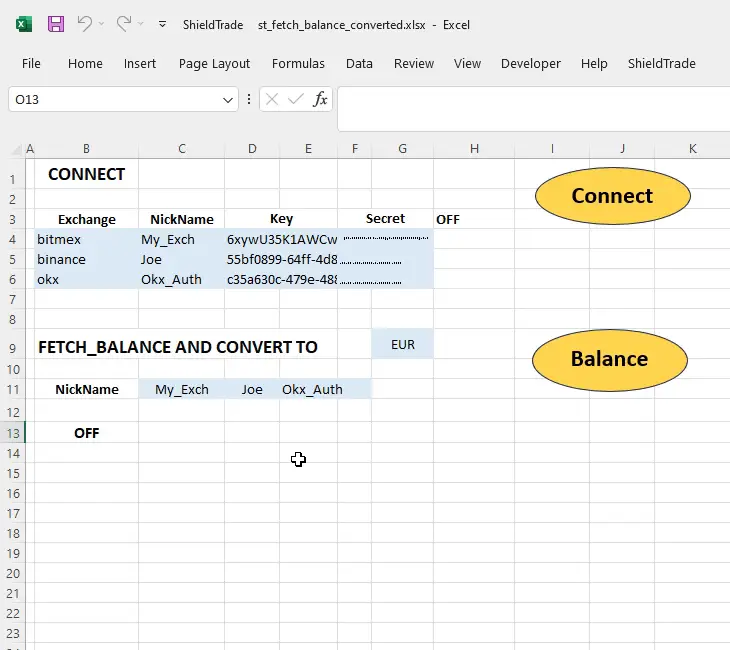
Connect your exchange with your API keys.
Your credentials and workbooks stay on your computer.
View your holdings with tables and charts directly in Excel.
Get started with CryptoExcel and build your own crypto portfolio spreadsheet using exchange data.
Access crypto market data from supported exchanges directly in your local Microsoft Excel. Build your own crypto Excel spreadsheet, use familiar data sources, and keep control of your analysis.
CryptoExcel combines the power of Python-based analytical tools with the simplicity of Microsoft Excel, giving you the flexibility to create custom crypto analysis, apply technical indicators, and build your own models — without writing code.
Work with live and historical crypto market data using familiar Excel formulas. Apply technical analysis, calculate custom indicators, compare assets, and create models that fit your workflow.
Access Python-powered analytical tools directly in Excel as easy-to-use functions. Explore technical indicators, build custom calculations, and analyze market trends without needing Python programming skills.
Build your own crypto Excel dashboard, explore market trends, and test analytical ideas with Excel’s flexibility. Whether you are a trader or an analyst, adapt your workbook to the way you work.
CryptoExcel adapts to different users, skills and goals. From individual investors to financial professionals, everyone can work with real-time and historical crypto data in Excel and build their own analysis, using familiar tools and their own workflow.
Track your holdings, monitor performance and evaluate your portfolio with live and historical crypto data directly in Excel. Create custom dashboards and use your own models.
Explore market trends, analyze price data and apply technical indicators using Excel. Build and test your own strategies with real-time and historical data from multiple exchanges.
Work with crypto market data for analysis, reporting and due diligence. Integrate crypto information into your existing Excel workflows and create custom reports.
Learn and experiment with real market data. Use familiar Excel formulas, explore different exchanges and assets, and develop practical skills in crypto analysis.
CryptoExcel is currently available as a free beta and can be used at no cost.
Download it, explore its features, and start building your own crypto Excel sheet.
For specific trading functionalities or personalized data processing, we are available to discuss your needs.
Contact Us →A crypto Excel add-in lets you access cryptocurrency market data directly in Microsoft Excel. CryptoExcel adds dedicated functions to retrieve prices, historical data, and exchange information without manually importing files.
Yes. CryptoExcel lets you access crypto data without coding. Use familiar Excel formulas to retrieve market prices, build custom spreadsheets, and analyze cryptocurrencies without writing Python scripts or VBA macros.
CryptoExcel is designed for Microsoft Excel on Windows. It runs locally on your computer and integrates with your existing Excel environment. Check the installation requirements before downloading.
Yes. Public market data is available without owning cryptocurrency or opening an exchange account. You can retrieve live crypto prices in Excel and explore historical market data using public exchange APIs.
CryptoExcel runs locally on your computer and connects directly to exchange APIs. Your Excel workbooks remain under your control, and data requests do not pass through CryptoExcel servers.
No funds need to be transferred to CryptoExcel. Public market data can be accessed without API keys. Functions requiring authenticated exchange access may need your own credentials, depending on the exchange and operation.
Yes. CryptoExcel supports live crypto market data, historical cryptocurrency prices, and data refresh. You can use Excel formulas to build your own crypto portfolio spreadsheet, dashboards, and market analysis models.
Yes. CryptoExcel is currently available as a free beta. You can install the add-in and explore its available functions without purchasing a subscription. Future commercial plans and advanced features may be introduced separately.