
Crypto Portfolio Excel
Managing and tracking a crypto portfolio in Excel quickly becomes complex when multiple exchanges, non-custodial wallets, and different operational strategies are involved over time.
For advanced users, the problem is not simply “seeing a balance”, but reconstructing the portfolio structure, its historical evolution, and real asset exposure, while maintaining full control over the data.
This page explains what it means to manage a crypto portfolio in Excel, why Excel remains the reference tool for professional analysis, and how to approach the problem in a structured way.
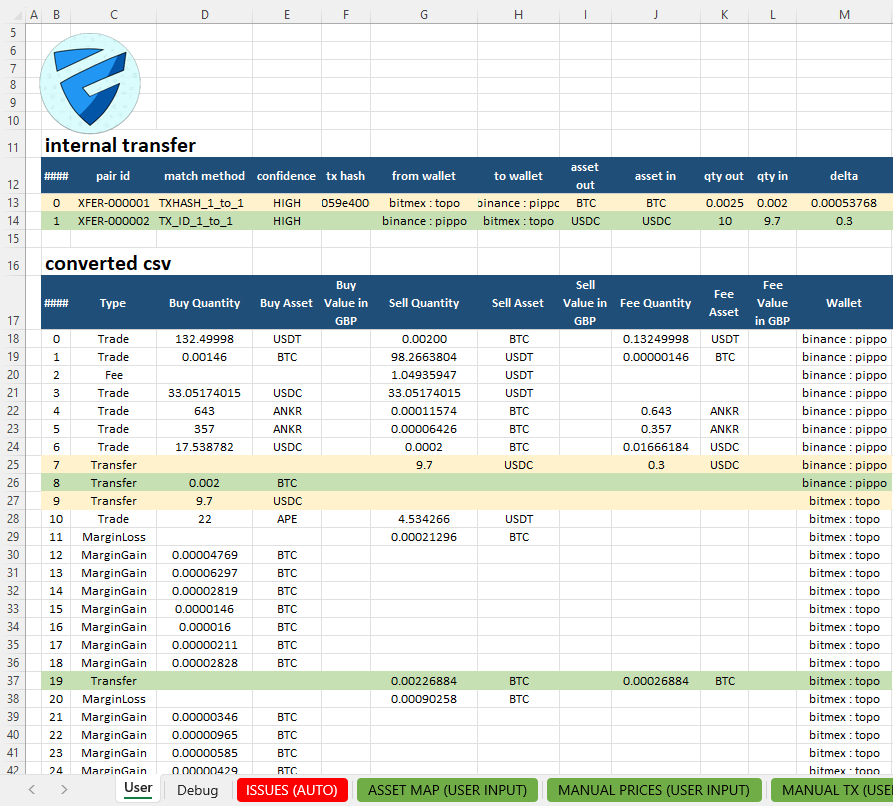
The real crypto portfolio problem
A crypto portfolio is rarely contained in a single place.
Over time, users typically accumulate data from:
multiple centralized exchanges
non-custodial wallets
internal transfers
on-chain activity
partial or time-limited CSV exports
This fragmentation makes it difficult to:
understand real asset exposure
correctly track portfolio evolution
compare different periods
verify numbers in an auditable way
In these situations, automatic dashboards and simplified tracking apps only show a final representation, not the underlying data model.
It is therefore essential to import and normalize crypto CSV files in Excel.
Why Excel remains the standard for portfolio management
Despite the availability of many SaaS tools, Excel remains the operational standard for professionals working with complex financial data.
Concrete reasons include:
formula transparency
direct control over transformations
step-by-step validation
custom analysis without platform constraints
integration with existing models
In crypto, Excel allows the portfolio to be treated not as a balance, but as a set of flows, positions, and states over time.
What “crypto portfolio” really means in Excel
In a professional context, a crypto portfolio is not just:
the current value
a list of assets
A structured portfolio includes:
asset positions
fund provenance
movements between wallets and exchanges
time-based evolution
consolidation of heterogeneous sources
In Excel, this becomes a data model, not a simple view.
Portfolio tracking: a function, not the goal
The term tracking is often associated with:
monitoring apps
automatic price updates
simplified visual dashboards
In Excel, portfolio tracking is a consequence of the model, not the starting point.
When data is:
normalized
consolidated
historized
tracking becomes natural:
exposure evolution
period comparisons
exchange or wallet-level analysis
anomaly detection
For users interested specifically in the operational side of tracking, there is also a dedicated guide on how to build a crypto tracker in Excel.
Building a crypto portfolio in Excel
A structured approach typically involves:
Importing data from exchanges and wallets
Normalizing assets, quantities, and operations
Consolidating everything into a single model
Analyzing data through Excel tables, pivots, and formulas
The goal is not to hide complexity, but to make it readable and verifiable.
Typical Excel views
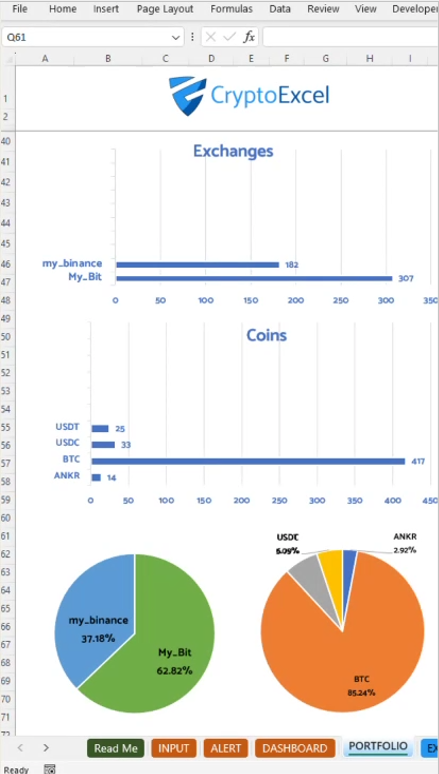
A crypto portfolio in Excel enables views such as:
consolidated portfolio by asset
exposure by exchange or wallet
historical position evolution
periodic portfolio snapshots
These views are derived from data, not from opaque predefined rules.
Who this approach is for
This portfolio approach is suited for:
active traders
multi-exchange users
professionals and advisors
Excel-centric workflows
It is not designed for:
occasional users
mobile-first “plug & play” solutions
users uninterested in understanding their data
Relationship with other domains
Portfolio management in Excel is often the starting point for:
advanced analysis
reconciliations
structured reporting
tax calculations
For this reason, the crypto portfolio domain is distinct but closely related to areas such as taxation and data normalization.
FAQs
Is a crypto portfolio in Excel the same as a tracker?
No. A tracker shows balances or snapshots. A crypto portfolio in Excel is a data model that includes flows, positions, and historical states, enabling verification and deeper analysis.
Is this portfolio approach meant for tax reporting?
Not necessarily. Portfolio management and taxation are separate domains. A structured Excel portfolio can be a useful foundation, but tax reporting requires dedicated logic and specific criteria.
Is it suitable for non-custodial wallets and multiple exchanges?
Yes. The concept of a crypto portfolio in Excel is designed to consolidate heterogeneous data sources, including multiple exchanges and non-custodial wallets, while preserving visibility and control.