
When crypto tax becomes a nightmare, Excel is how you bring order back
Crypto tax reporting is rarely simple — and for active traders, it can quickly turn into a nightmare.
Multiple exchanges, custodial and non-custodial wallets, on-chain transactions, thousands of trades, CSV files that don’t match, fees recorded in different ways, transfers that look like taxable events. At some point, your spreadsheet stops telling a coherent story.
Most serious traders don’t struggle because they don’t understand crypto.
They struggle because their activity spans different parts of the crypto ecosystem, and the data never arrives in a clean, unified format.
CryptoExcel was built to bring all of this activity together inside Excel — clearly, consistently, and in a way that can be reviewed and understood.
Why Crypto Tax Becomes Hard for Active Traders
Crypto platforms were not designed for tax reporting.
They were designed for trading.
As your activity grows, you start dealing with:
different CSV formats for each exchange
separate files for trades, deposits, and withdrawals
fees recorded inconsistently
transfers between your own accounts flagged as taxable events
wallet ledgers that follow completely different structures
If you are a serious trader, you also don’t leave all your assets on exchanges.
You move funds to non-custodial wallets for security, control, and long-term storage.
That’s where most spreadsheets — and many tax tools — start to break.
A Structured Approach to Crypto Tax in Excel
CryptoExcel takes a structured, transparent approach.
Instead of hiding calculations behind a cloud dashboard, it works directly inside Excel, turning it into a crypto-aware environment that understands exchanges, wallets, and transaction flows.
The goal is not automation for its own sake.
The goal is clarity.
How Crypto Tax Reporting Works with CryptoExcel
1. Bring all your crypto data into Excel
Crypto activity rarely lives in one place.
With CryptoExcel , you can work with:
exchange data via read-only API keys
CSV files exported from centralized exchanges
ledger-style exports from non-custodial wallets, which often use very different formats
Whether your activity happens on exchanges, in self-custody, or across both, everything is brought into a single Excel workflow.
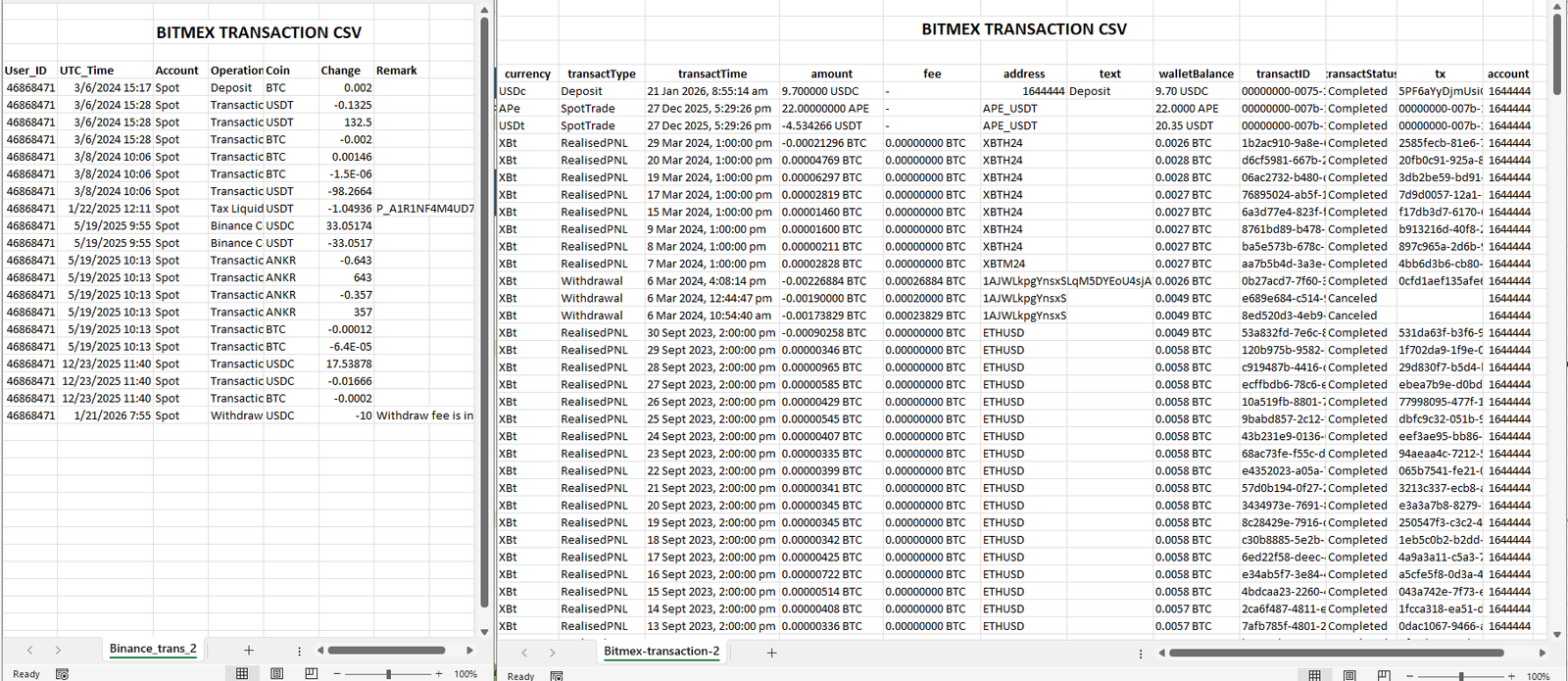
2. Normalize exchanges, wallets, and on-chain activity
This is where most tools struggle.
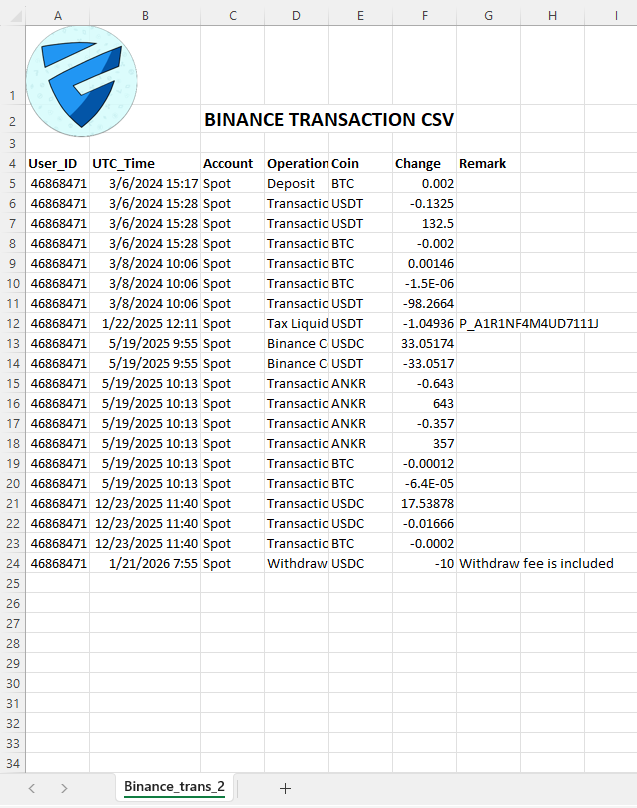
Exchange CSVs, wallet ledgers, and on-chain exports:
use different column structures
record fees differently
treat transfers inconsistently
don’t agree on timestamps or asset symbols
CryptoExcel is designed to handle this reality.
It:
interprets movements between your own wallets correctly
avoids treating internal transfers as taxable events when they are not
aligns assets, quantities, and timestamps consistently
All processing runs locally in Excel, so you can always inspect:
the original source data
the normalized result
how each transaction is interpreted
3. Calculate gains and losses with full visibility
Once data from exchanges and non-custodial wallets is normalized, Excel shows:
buys and sells in a clear structure
movements between your own accounts correctly identified
fees applied consistently
realized gains and losses you can verify row by row
This matters when:
transaction volumes are high
activity spans multiple platforms
accuracy matters more than shortcuts
Nothing is hidden.
Nothing is guessed.
4. Produce clear, audit-ready Excel reports
The final result is a structured Excel report that reflects your entire crypto activity, not just what happened on exchanges.
You can:
keep it for your records
review it with an accountant
explain it transaction by transaction if needed
Excel remains the final, readable layer — not a locked export.
Why Excel Still Matters for Crypto Tax
Many crypto tax tools focus on convenience.
Excel focuses on understanding.
Excel provides:
transparency
long-term auditability
flexibility for complex scenarios
a shared language with accountants and advisors
CryptoExcel doesn’t replace Excel.
It makes Excel capable of handling real crypto complexity.
Why This Is Different from SaaS Crypto Tax Software
Most crypto tax tools are built as cloud SaaS platforms.
They focus on speed and automation, but often hide how calculations are performed.
For active traders, this can become a problem.
When data is processed remotely, you usually see the final numbers — not how trades, fees, transfers, and wallet movements were interpreted. Reviewing edge cases or explaining results to an accountant becomes difficult.
CryptoExcel takes a different approach.
All processing happens locally inside Excel, using data you can inspect at every step. Transactions remain visible, calculations remain traceable, and reports remain editable. Nothing is locked behind a web interface, and nothing disappears when a subscription ends.
This makes CryptoExcel especially suitable for traders who value transparency, auditability, and long-term control over their tax data.
Who This Workflow Is For
This approach is designed for:
active retail traders with many transactions
users trading on multiple exchanges
traders who move funds to non-custodial wallets
Excel-first professionals
accountants and consultants working with crypto data
If your crypto activity spans exchanges, wallets, and long time periods, this workflow reflects that reality.
A Clearer Way to Handle Crypto Tax Data
Serious crypto trading doesn’t happen in a single account.
Crypto tax reporting shouldn’t pretend it does.
CryptoExcel helps bring exchanges, wallets, and on-chain activity together inside Excel — in a way that remains readable, defensible, and consistent over time.
FAQs
What is crypto tax reporting in Excel?
Crypto tax reporting in Excel means organizing, normalizing, and calculating crypto transactions directly in a spreadsheet, using exchange data and wallet ledgers instead of relying on opaque cloud reports.
Can Excel handle large crypto trading histories?
Yes. Excel can handle large datasets when data is structured correctly. CryptoExcel focuses on normalization and consistency so high-volume trading histories remain readable and auditable.
Does this work with non-custodial wallets?
Yes. Non-custodial wallets often export ledger-style transaction files that differ from exchange CSVs. CryptoExcel is designed to normalize both exchange data and wallet ledgers into a consistent Excel format.
Are transfers between my own wallets taxable?
In most cases, transfers between wallets you control are not taxable events. Correctly identifying them is essential, which is why transparent data handling in Excel matters.Security is a core feature. The add-in is locally installed on your Windows PC, API keys never leave your computer, and all connections are encrypted. You can also use read-only API keys for safe tracking without trading or withdrawal permissions.
Is this a replacement for professional tax advice?
No. Excel reports are a foundation. They help you understand and document your activity so accountants and advisors can review accurate, consistent data.