
Crypto Excel » Explore Crypto Excel » How to connect Crypto Excel to HitBTC.

How to connect CryptoExcel to HitBTC.
If you want to connect HitBtc with Excel using CryptoExcel Add-in, this guide will walk you through everything you need. In just a few minutes, you’ll be able to stream real-time data or manage your portfolio and orders directly from Excel.
HitBtc is an Exchange founded in 2016 that has relatively low trading fees which decrease with volume.
CryptoExcel is a Python-based Excel add-in that allows you to pull real-time crypto data from 100+ exchanges, including HitBTC, directly into Excel.
HitBTC Integration: Public vs Private Functions
After connecting Excel to HitBTC using CryptoExcel add-in you can use Public functions and Private functions.
1. Public Functions (No Account Needed)
Public functions do not require any registration or authentication and you can use them as soon as the Add-in is installed.
You can access in real time:
Order books
Live trades
Historical trades
Candlestick (OHLCV) data
Funding rates and more
Example: to stream the BTC/USDT book from HitBTC into Excel, simply enter:
=ST_WATCH_BOOK("hitbtc","BTC/USDT")2. Private Functions (Authentication Required)
Private functions allow you to perform authenticated operations such as:
Viewing account balances
Tracking open positions
Sending and cancelling orders
Coin transfers
To use private functions, you’ll need to authenticate using your HitBTC APIs credentials. This requires creating an API key, secret, directly from your HitBTC account.
=ST_INSTANTIATE("hitbtc","nickname","api_key","api_secret")
Keep reading to discover how to get HitBTC’s API key and API secret
What you need to connect CryptoExcel to HitBTC.
Steps to connect Crypto Excel to HitBTC
1. Log in to your HitBTC desktop account.
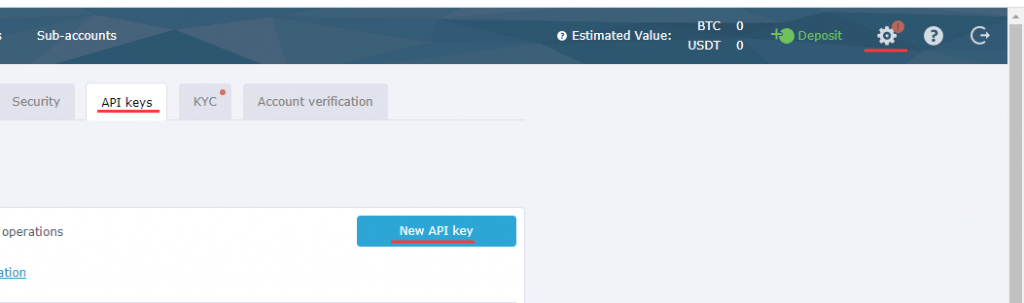
2. Click on setting in the upper right corner, then API Keys and New API key
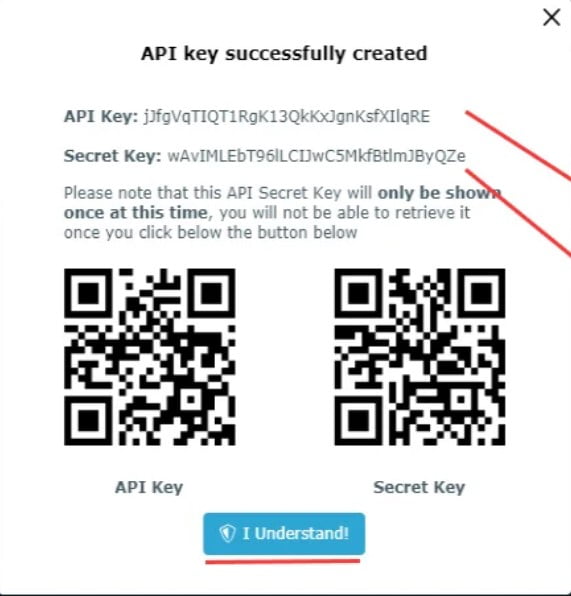
3. Your API Key has been successfully created. You can copy and paste the API Key and Secret Key onto Crypto Excel connection form and click connect. Confirm you understand
Remember you will not be able to see your API secret again for security reasons.
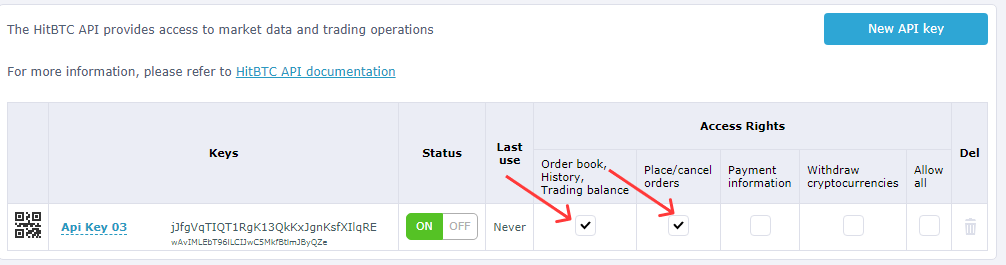
4. API Key is ready but it does not have any access rights. Click on Order book/History/Trading balance and Place/Cancel orders.
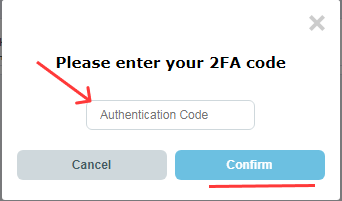
5. Every time you add a new right to your newly created API you will be asked to verify your account using your email and Google Authenticator or SMS depending on your security settings.
Autenticate HitBTC in Excel.
Now that you have your credential you can authenticate HitBTC and start using Crypto Excel private function.
As an example, if you want to authenticate your account and give it the nickname of Joe, and your API key is abcd and your API secret is 12345; you can enter in a cell
= st_instantiate(“hitbtc”, “joe”, “abcd”, “123”)
if the response is Joe is authenticated you can start using the private function.
Try =st_balance(“joe”).
Next Steps
By following these steps, you’ve successfully connected Excel to HitBTC. Now You can:
Monitor live order books
Track balances across multiple exchanges
Automate trades directly from Excel
Build a complete crypto portfolio tracker
Explore our Academy and Docs to learn more about private functions and advanced automation.
Read our related tutorials: