
Crypto Excel » Crypto Education » How to get crypto data into excel in 2025

How to get Crypto Data in Excel (2025 Guide)
Introduction to Crypto Data in Excel
As cryptocurrency adoption continues to grow, investors and traders need effective ways to manage and analyze data. One of the most powerful and accessible tools for this is Microsoft Excel. With Excel, you can organize real-time crypto prices, track portfolio performance, and run advanced market analysis — all without complex coding. More info: read Benefit of crypto data into excel article
Excel’s strength lies in its versatility: it supports custom formulas, data visualization through charts and graphs, and seamless integration with external data feeds. Whether you’re a beginner tracking a few coins or an advanced trader managing multiple accounts, Excel can be customized into your own crypto portfolio tracker spreadsheet.
Methods to Get Crypto Prices into Excel
Excel offers multiple approaches to importing cryptocurrency data. In 2025, the three most popular methods are:
- Native Excel functions
- Web queries with APIs
- Crypto Excel Add-ins
Using Native Excel Functions
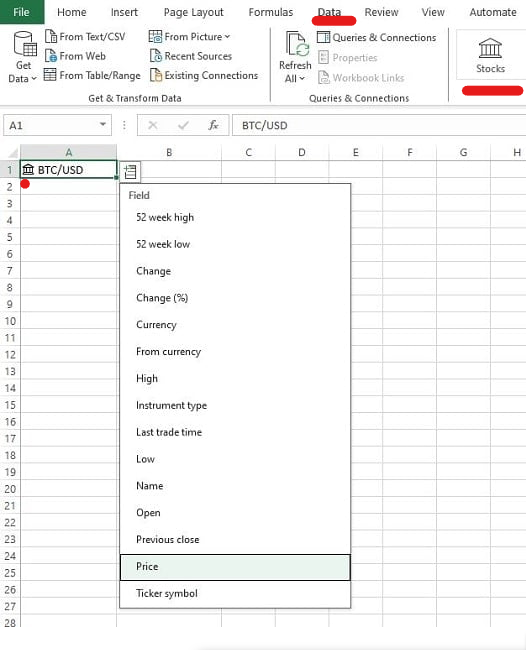
If you’re a Microsoft 365 subscriber, Excel includes a built-in way to fetch crypto prices for a limited number of coins.
For example:
- Supported pairs include BTC, ETH, XRP, LTC, and BCH versus major fiat currencies (USD, EUR, GBP, JPY, AUD).
- In a cell (e.g., A1) type BTC/USD and convert it to the Stocks Data Type via the Data tab.
- Once converted, you can display columns such as price, market cap, and volume.
Limitations: The data is refreshed about every 5 minutes and only works for a few pairs.
Pulling Crypto Prices with Web Queries and APIs
For broader access, you can connect Excel to a crypto data provider via APIs. This gives you access to thousands of coins, historical OHLCV, and even derivatives data.
Popular APIs include:
- CoinGecko – Industry leader, used by Metamask and Coinbase.
- CoinMarketCap – Real-time and historical price data.
- CoinPaprika – Market + social activity insights.
- CoinDesk – Trading data and crypto news.
- Dune – Flexible, developer-friendly endpoints.
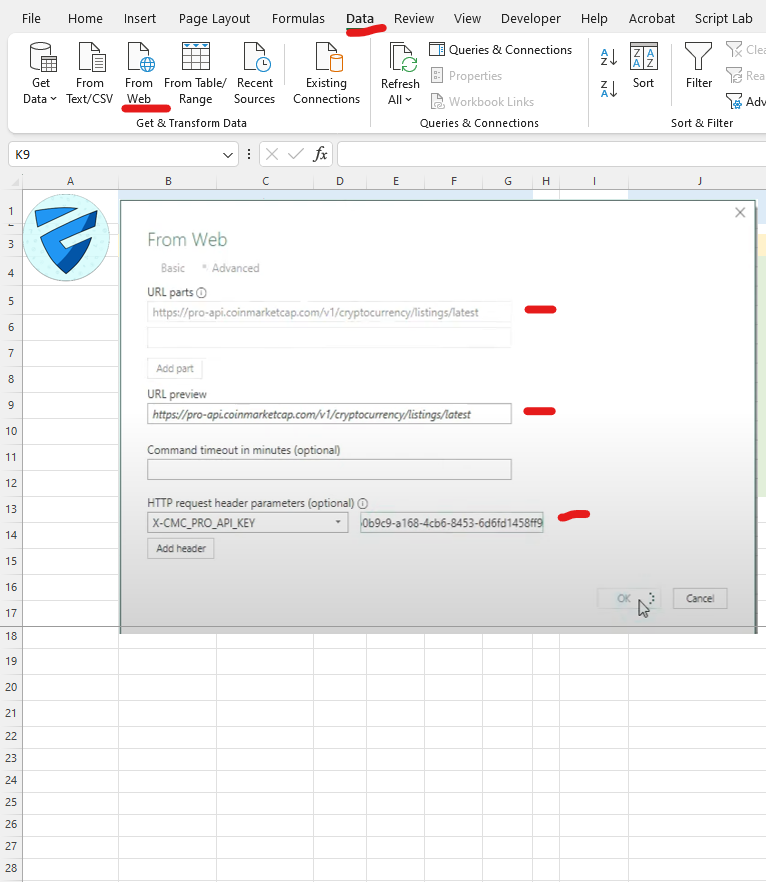
Setup involves going to Data > From Web in Excel, entering the API URL, your headers, and API key. Each provider has its own documentation and free tiers.
You can then configure auto-refresh under Data > Refresh All > Connection Properties to update every few minutes or manually.
Limitations: The number and type of query are limited by the free tier and it might ne difficult for Excel novice.
CryptoExcel Add-in (Recommended)
The easiest, most flexible, and professional solution is CryptoExcel — a Python-powered Excel Add-in that connects directly to 100+ exchanges.
Unlike native functions (limited) or APIs (complex setup), CryptoExcel lets you import live and historical crypto data directly into Excel with simple formulas.
With CryptoExcel you can fetch:
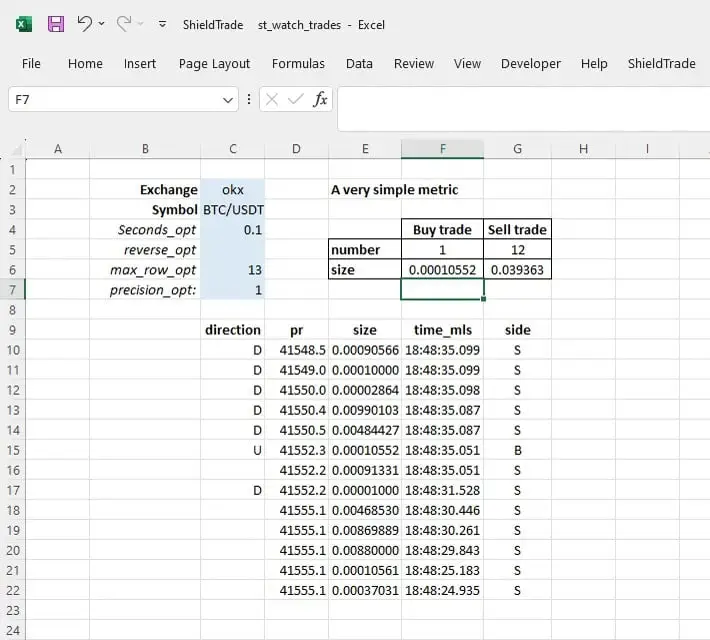
- Real-time data: order books, trades, balances, conversion rates.
- Historical data: OHLCV candles, trade history, funding rates.
- Portfolio insights: aggregate balances across exchanges, auto-convert to fiat, calculate PnL.
Example formula:
=ST_BALANCE_CONVERTED(“binance”,”my_api_key”,”my_secret”)
This will pull your Binance balances into Excel and convert them automatically into your preferred fiat currency. This function is mostrly used for portfolio tracking
Why CryptoExcel stands out:
- No coding required — everything works as Excel functions.
- Local installation for maximum security (your API keys never leave your PC).
- Advanced analytics thanks to built-in Python libraries (Pandas, Matplotlib, CCXT).
- Ready-to-use templates for portfolio tracking, dashboards, and risk management.
In short, CryptoExcel turns Excel into a full crypto trading workstation. Instead of relying on third-party apps with privacy risks or limitations, you get real-time crypto prices in Excel, fully under your control.
FAQ
How can I get crypto prices into Excel without coding?
You can use built-in Excel stock data types for basic pairs, or install CryptoExcel, an add-in that fetches real-time data from 100+ exchanges directly into Excel with simple formulas.
: Is Excel better than using an online crypto portfolio tracker?
Yes, With Excel, you keep full control of your data, customize every metric, and avoid risks linked to cloud-based trackers. CryptoExcel makes it even easier by automating data fetching securely on your PC.
Can Excel automatically refresh crypto prices?
Yes. Excel allows you to auto-refresh API queries every few minutes. With CryptoExcel, updates are real-time via WebSockets, so your prices and balances stay current without manual refreshes.